The Payex API is organized around REST to make it clearer and easier to understand. All our API responses return JSON, including errors.
API Environment Summary
There are two servers for our API, one for sandbox and the other for production environments. You may test with sandbox endpoints before going into production, which doesn’t affect your live data or interact with live banking networks.
The secret API key you use to authenticate the request determines whether the request is sandbox mode or production mode. Do not use Production Secret in the Sandbox Environment, or vice versa, as it will fail. API requests without authentication will also fail.
You may get your API secret from Payex Portal links below. The login credentials are sent to the registered merchant email, titled “Account Set Up Successful” by Payex (contact@payex.io):
- Sandbox Environment: https://sandbox-payexportal.azurewebsites.net/
- Production Environment: https://portal.payex.io/
Note: To access the Sandbox portal, merchant to login with your registered email address and default password = “Password“
Before you start
Go to https://portal.payex.io/Home/Register to sign up as a merchant.
Submit all required documents as shown in the merchant portal and get approval from our processing team. If you need more assistance, please contact us at merchantsupport@payex.io
]]>To authenticate your account, you have to include your secret API key in the request which can be accessed in the Payex Dashboard. Here are the steps to get authorisation token of your account:
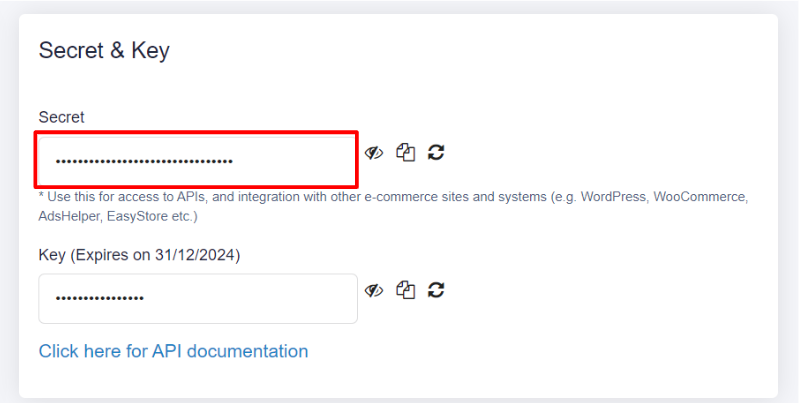
Go to Payex Merchant Portal > Settings > Copy to Secret
| Parameter | Type | Category | Description | Example |
| Secret | string | required | Use this for access to APIs, and integration with other e-commerce sites and systems (e.g. WordPress, WooCommerce, AdsHelper, EasyStore etc.) | I8W25Imwl1vWVu3KevZGy2fcfAI43Uzp |
Go to Payex API > Select the environment > Click “Authorize”

Follow Authorization Steps
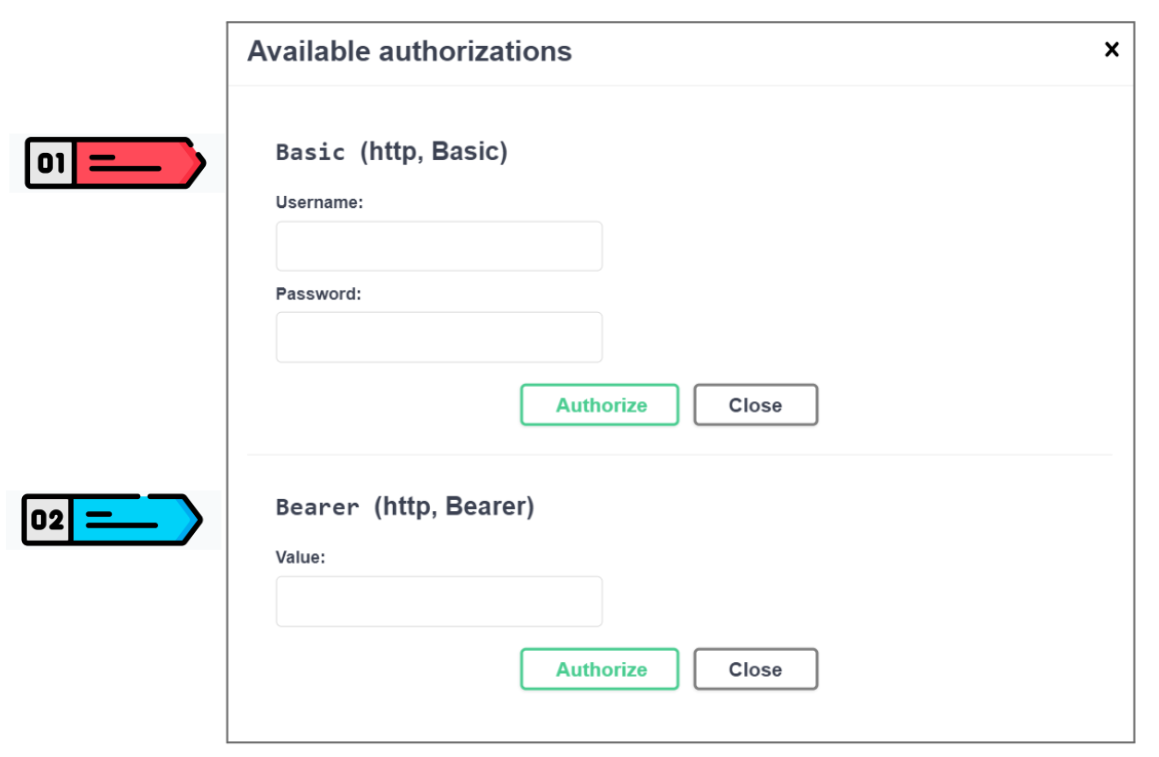
Authentication Step 01: Basic (http, Basic)
- Under Username, input registered merchant email with Payex.
- Under Password (change to Secret), input Secret from Payex Merchant Portal.
- Click “Authorize” again. The “Authorize” button should be replaced with the “Logout” button.
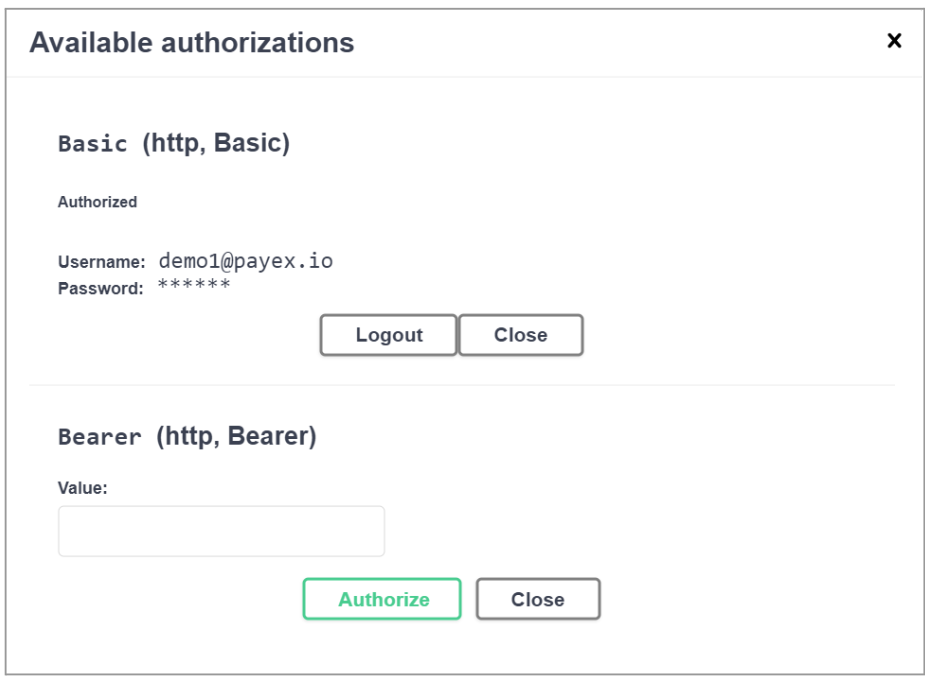
Authentication Step 02: Bearer (http, Bearer)
- Go to /api/Auth/Token
- Click “Try it out” > Click “Execute” > Access token will be returned
- Copy the Token
- Input the token in the Bearer section under Value in the same Authorize screen.
- Click “Authorize” again
With that, you now have access to the rest of the APIs.
To make it easier to get familiar with Payex Authentication, we’ve published a sample payment flow through Swagger and Postman. Related video:
Payment Request through Swagger
Payment Request through Postman
This endpoint provides the following functionalities:
- Initializes the payment/capture process for FPX, Cards, E-wallets and Subscription Payments (Direct Debit/Auto Debit).
- Payment forms allow merchants to accept online payments through Payex web applications.
- Customers can enter payment details or select e-wallet / installment options to complete the payment process from their smartphones and website.

| Body Parameter | Type | Validation | Description | Example |
|---|---|---|---|---|
| amount required | integer | Minimum: 100 | Actual amount of the transaction. Decimal places support up to two decimal places. If the amount is not inputted upfront, the corresponding payment method will accept any amount as payment (open-ended amount). | Values should be in cents. For example, MYR 10.00 should be inputted as 1000. Maximum of MYR 30,000.00 for FPX, and MYR 1,000,000.00 for FPX Corporate. |
| currency required | string | Default is MYR | Three-letter code of the transaction’s currency. Will be auto-filled as MYR. | MYR |
| collection_id | string | Default collection id will be used if not provided | DWcUMile | |
| capture conditional | boolean | Default is true | Default is “true” to capture the payment immediately. Set to “false” to authorize payment to be captured at a later date, using the /api/v1/Transactions/Capture endpoint. Note: To try this, do ensure your account is enabled with pre-authorisation | true |
| customer_name required | string | maxLength = 50 | Name of the customer | John Doe |
string ($email) | maxLength = 50 | Email of the customer | john@email.com | |
| contact_number | string | maxLength = 20 | Contact number of the customer | 0123456789 |
| address | string | maxLength = 200 | Address of the customer | 48 Jalan Gembira Taman Desa |
| postcode | string | maxLength = 10 | Postcode of the customer | 57100 |
| city | string | maxLength = 50 | City of the customer | Petaling Jaya |
| state | string | maxLength = 50 | State of the customer | Selangor |
| country | string | maxLength = 50 | Country of the customer | Malaysia |
| shipping_name | string | maxLength = 50 | Name of the customer for delivery | John Doe |
| shipping_email | string ($email) | maxLength = 50 | Email of the customer for delivery | john@email.com |
| shipping_contact_number | string | maxLength = 20 | Contact number of the customer for delivery | 0123456789 |
| shipping_address | string | maxLength = 200 | Address of the customer for delivery | 48 Jalan Gembira Taman Desa |
| shipping_postcode | string | maxLength = 10 | Postcode of the customer for delivery | 57100 |
| shipping_city | string | maxLength = 50 | City of the customer for delivery | Petaling Jaya |
| shipping_state | string | maxLength = 50 | State of the customer for delivery | Selangor |
| shipping_country | string | maxLength = 2 | Country of the customer for delivery | Malaysia |
| description | string | maxLength = 200 | Free-text field for any additional information during payment creation. Will be null if none is provided. | beauty product |
| reference_number | string | maxLength = 40 | 80TJCFJeOpPh4r7f1 | |
| items | Any data as long as in the form of array of dictionaries | |||
| metadata | Any data as long as in the form of array of dictionaries | |||
| payment_type | string | Enum: [ card, fpx, ewallet, instalment ] | Authorized values for merchant can be retrieved using the /api/v1/Merchants/TransactionTypes endpoint. | card |
| payment_types | string | Enum: [ card, fpx, ewallet, instalment ] | Customize payment types that are visible to users for each transaction. Defaults to all “payment_types” enabled for merchant if not specified. | card |
| show_payment_types | boolean | When “payment_type” is specified, use this flag to determine whether all payment types are visible to users, or just the specified “payment_type“. Default when “payment_type” is specified is “false“, while default when “payment_type” is unspecified is “true“. | false | |
| tokenize | boolean | “true” if Merchant wants to tokenize customer’s card details, else, omit parameter | true | |
| card_on_file | string | Type of “credential-on-file” / “card-on-file” payment for subsequent usage. Indicates future card-on-file usage where customer can save the card for future checkout. When “tokenize” is checked, a “card_on_file” will be returned to Merchant at the end of the transaction, that ID must then be stored by Merchant in order to reuse CARD ON FILE functionality. | ||
| return_url | string | maxLength = 150 | Upon payment, customers can click on a button. Return_url is the link where you want the customer to go back to after clicking the button. | <any valid domain> |
| callback_url | string | maxLength = 150 | URL to your server for Payex to update on response | <any valid domain> |
| accept_url | string | maxLength = 150 | Redirect URL upon accepted payment. If not provided, return_url will be used. Note: This is for merchants who manually create payment link directly from Payex portal i.e. after payment is successful → accept_url is where they want customers to be redirected to. | <any valid domain> |
| reject_url | string | maxLength = 150 | Redirect URL upon rejected payment. If not provided, return_url will be used. Note: This is for merchants who manually create payment link directly from Payex portal i.e. after payment is rejected → reject_url is where they want customers to be redirected to. | <any valid domain> |
| nonce | string | maxLength = 80 | Unique identifier to be returned during payment response | |
| source | string | Custom field to specify source of transaction | ||
| send_email | boolean | “true” to email payment intent link to recipient as specified by “email” parameter | false | |
| single_attempt | boolean | “true” if payment intent can only be attempted once and will be deactivated after the attempt regardless of payment status. “false” if payment intent can be reattempted multiple times and will only be deactivated once “expiry_date” of payment intent has passed | false | |
| expiry_date | string ($email) | Expiry date of the payment intent, after which the payment intent will no longer be valid. Parameter should be in UTC time zone, following the format of the example. Default is 2 day after creation. | yyyy-MM-ddTHH:mm:ssZ | |
| splits amount required | integer | minimum: 100 | This section is required if you need to split transactions to other accounts such as marketplace use case. Values should be in cents. For example, MYR 10.00 should be inputted as 1000, or if 1.00% should be inputted as 100 | 1000 |
| split_type required | string | Enum: (“abs”, “pct”) | Whether split should be absolute amount or percentage amount | abs |
| destination required | string | Payex Registered Merchant email for transaction split to | contact@payex.io | |
| type required | string | Type of split | platform | |
| description | string | Description of split | Platform commission fees |
Create Payment Forms Response

A successful Payment Request creation returns a HTTP 200 status code with the following response parameters.
| Body Parameter | Type | Validation | Description | Example |
|---|---|---|---|---|
| status | string | Enum: [ 00, 99 ] | Status of payment | Approved |
| result status key url error | stringstringstringstring | Enum: [ 00, 99 ] {api_environment}/Payment/Form/{key}. | Payment Intent ID Redirect to URL returned to access payment form | |
| message | string | Success |

| Body Parameter | Type | Validation | Description | Example |
|---|---|---|---|---|
| amount | string | Actual amount of the transaction. Decimal places support up to two decimal places. If the amount is not inputted upfront, the corresponding payment method will accept any amount as payment (open-ended amount). | Values should be in cents. For example, MYR 10.00 should be inputted as 1000. Maximum of MYR 30,000.00 for FPX, and MYR 1,000,000.00 for FPX Corporate. | |
| currency | string | Three-letter code of the transaction’s currency. Will be auto-filled as MYR. | MYR | |
| customer_name | string | Name of the customer | John Doe | |
| description | string | Free-text field for any additional information during payment creation. Will be null if none is provided. | beauty product | |
| reference_number | string | maxLength: 40 | You may input any reference number here | 80TJCFJeOpPh4r7f1 |
| mandate_reference_number | string | Refers to reference number for mandate generated by Payex | MN10000011621583965 | |
| payment_intent | string | This refers to Payment Intent endpoint for creating payment forms. | b96165b897c746c0a2a42032e8bfafea | |
| collection_id | string | Collection ID | owbnr7xq | |
| invoice_id | string | |||
| txn_id | string | Transaction ID | PX10000011627008035 | |
| txn_date | string($yyyyMMddHHmmss) | Transaction Date | 20210723104035 | |
| external_txn_id | string | External Transaction ID | 2009151119230241 | |
| response | string | Payment status description. Unique to each payment type | ||
| auth_code | string | Payment response code. ’00’ – Successful, ’09’ – Pending, ’99’ – Pending when FPX, everything else – Failed. For detailed descriptions of each response code, please refer to reference table sheet at the top of the documentation | ||
| auth_number | string | Authorization Number | 15733223 | |
| fpx_mode | string | Enum: [ 01, 02 ] | 01 – retail, 02 – corporate | |
| fpx_buyer_name | string | Name of FPX buyer | N@me()/ .-_,&Buyer’`~*;: | |
| fpx_buyer_bank_id | string | Bank code of FPX buyer | Refer to list of FPX buyer bank code | |
| fpx_buyer_bank_name | string | Bank name of FPX buyer | CIMB Bank | |
| card_holder_name | string | N@me()/ .-_,&Buyer’`~*;: | ||
| card_number | string | ************1111 | ||
| card_expiry | string | 03/27 | ||
| card_brand | string | Can be any of “VISA”, “MASTERCARD”, “UNIONPAY” | VISA | |
| card_on_file | string | 64 alphanumeric key length | Type of “credential-on-file” / “card-on-file” payment for subsequent usage. Indicates future card-on-file usage where customer can save the card for future checkout. | 761d35566422d504c96a0f28f3637eeea0d9808a73897f533b53dd9850e4dfbb |
| signature | string | SHA512(secret + | + txn_id) | 3b0806197e8b948a81b2faff2839b3194b9f52707a336e5039a52204a2591abfbd5d4e5aceec4381b15cf0431e02aa6e2c9d17c255e6e7083e47ccfe c182cbaa | |
| txn_type | string | Used to differentiate between different transaction type | FPX FPX CCA FPX B2B FPX CCA B2B Direct Debit Mandate – Authorization Mandate – Approval Mandate – Maintenance Mandate – Termination Malaysian Debit Card Malaysian Credit Card Foreign Card Card – Foreign Currency Auto Debit – Authorization GrabPay PayLater by Grab Postpaid PayLater by Grab Instalment Touch ‘n Go eWallet ShopeePay Riipay Split Unpaid | |
| nonce | string | lenKjMY3VInjYHmtSX398aT2socMZGCOkLIQ8OPPeIaerXSVRW0Arzd33dLnd5M8 |
- This API allows you to manage, search and view Transactions and Settlement.
- This API is equivalent to the “Transactions” and “Settlements” tab from Payex dashboard. See payex.io/docs on how to use transaction and settlement tabs in Payex dashboard.
Get transaction by Transaction ID
Request this endpoint to get specific transaction details by ‘id’ as required parameter below.

Successful response returns parameters below with status code 200
| Body Parameter | Type | Validation | Description | Example |
|---|---|---|---|---|
| txn_date | | Transaction date | ||
| mid | string | Merchant ID number | ||
| name | string | Merchant name | ||
| title | string | |||
| collection_id | string | Default collection id will be used if not provided | owbnr7xq | |
| invoice_id | string | Invoice ID | <any string> | |
| txn_id | string | Transaction ID of Payex | PX10000011627008035 | |
| status | string | Enum: [ 00, 99 ] | Status: 00 if create successfully Status: 99 if error occurred | 00 |
| customer_name | string | Name of the customer | Test Customer | |
| currency | string | Three-letter code of the transaction’s currency. Will be auto-filled as MYR. | MYR | |
| base_amount | number($double) | Base amount | ||
| amount | number($double) | Amount | ||
| txn_type | string | Used to differentiate transaction types | FPX FPX CCA FPX B2B FPX CCA B2B Direct Debit Mandate – Authorization Mandate – Approval Mandate – Maintenance Mandate – Termination Malaysian Debit Card Malaysian Credit Card Foreign Card Card – Foreign Currency Auto Debit – Authorization GrabPay PayLater by Grab Postpaid PayLater by Grab Instalment Touch ‘n Go eWallet ShopeePay Riipay Split Unpaid | |
| fpx_mode | string | Enum: [ 01, 02 ] | Whether or not the customer uses a retail or corporate bank account for FPX payment | 01 – Retail, 02 – Corporate |
| fpx_buyer_name | string | Name of FPX buyer | Test Customer | |
| fpx_buyer_bank_id | string | Bank code of FPX buyer | TEST0021 Refer to list of FPX buyer bank code | |
| fpx_buyer_bank_name | string | Bank name of FPX buyer | CIMB Bank | |
| card_holder_name | string | Cardholder name | N@me()/ .-_,&Buyer’`~*;: | |
| card_number | string | Card number | ************1111 | |
| card_expiry | string | Card expiration date | 03/27 | |
| card_brand | string | Can be any of “VISA”, “MASTERCARD”, “UNIONPAY” | VISA | |
| external_txn_id | string | External Transaction ID | 2009151119230241 | |
| auth_code | string | Payment response code | 00 | |
| auth_number | string | Authorization number | 15733223 | |
string | Email of customer | test@email.com | ||
| contact_number | string | Contact number of customer | 0123456789 | |
| delivery_address | string | Delivery address of customer | 48 Jalan Gembira Taman Mega | |
| address | string | Address of customer | 48 Jalan Gembira Taman Mega | |
| postcode | string | Postcode of customer | 57100 | |
| city | string | City of customer | Petaling Jaya | |
| state | string | State of customer | Selangor | |
| country | string | Country of customer | Malaysia | |
| shipping_name | string | Name of the customer for delivery | John Doe | |
| shipping_email | string | Email of the customer for delivery | test@email.com | |
| shipping_contact_number | string | Contact number of the customer for delivery | 0123456789 | |
| shipping_address | string | Address of the customer for delivery | 48 Jalan Gembira Taman Mega | |
| shipping_postcode | string | Postcode of the customer for delivery | 57100 | |
| shipping_city | string | City of the customer for delivery | Petaling Jaya | |
| shipping_state | string | State of the customer for delivery | Selangor | |
| shipping_country | string | Country of the customer for delivery | Malaysia | |
| description | string | Free-text field for any additional information regarding the mandate authorization payment method | Beauty Product | |
| reference_number | string | Passed by merchant as optional parameter. | <any string> | |
| mandate_reference_number | string | Refers to reference number for mandate generated by Payex | MN10000171626860885 | |
| collection_number | string | Refers to collection number generated by Payex | CL10000023077b6050c4 | |
| collection_reference_number | string | Passed by merchant as optional parameter | <any string> | |
| payment_intent | string | This refers to Payment Intent endpoint for creating payment forms. | b96165b897c746c0a2a42032e8bfafea | |
| split_type | string | Type of split | platform | |
| split_description | string | Description of split | platform commission fees | |
| items | string | { } | ||
| metadata | string | { } | ||
| voidable | string |
Get all transactions
Request this endpoint to get all transactions from a date range using ‘start_date’ and ‘end_date’, or get transactions using specific identifiers like ‘payment_intent’, ‘txn_id’, ‘reference_number’, etc. Use ‘search_text’ if unsure of the actual identifier.
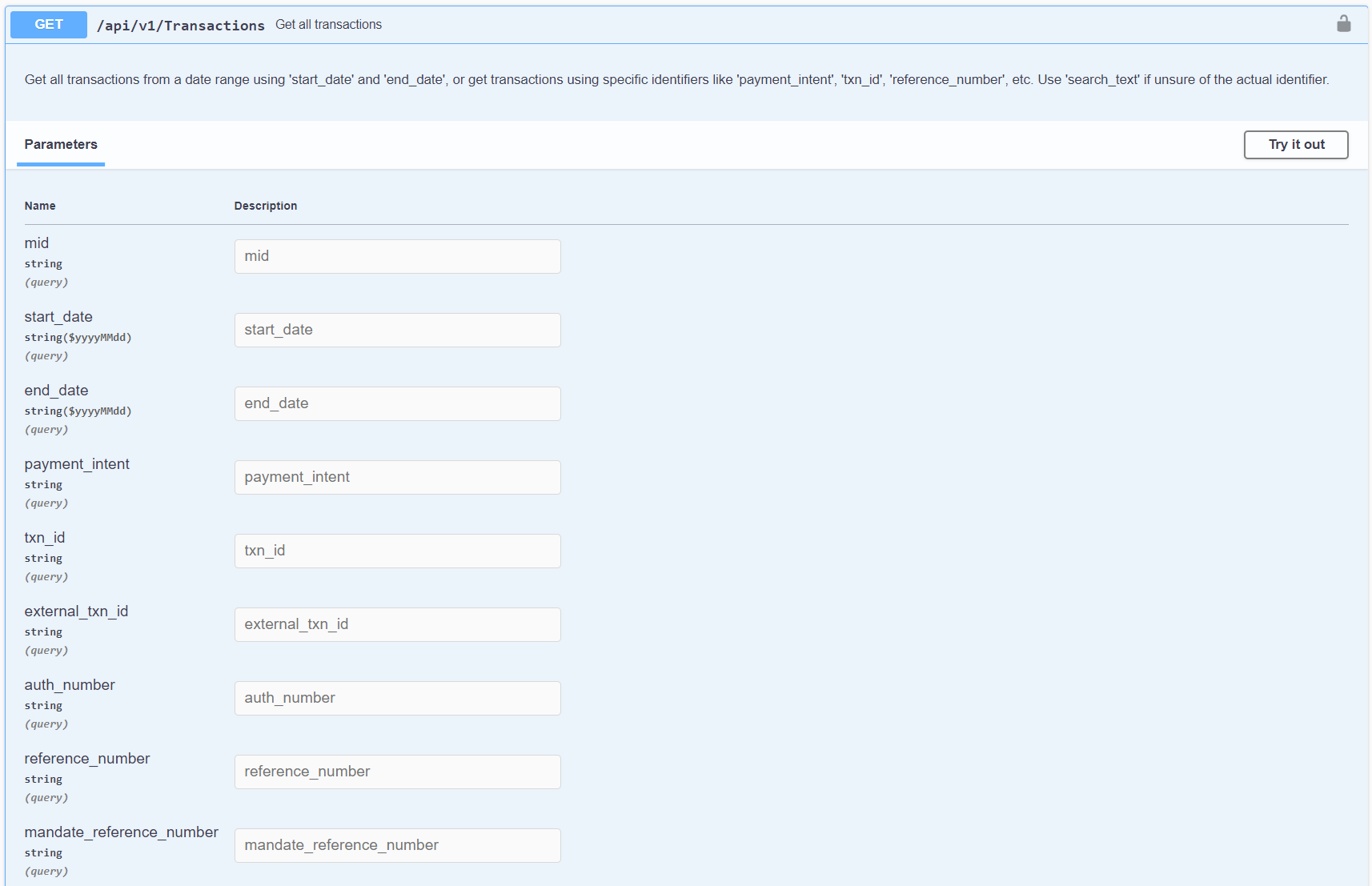

Note: Limit is how many rows to get, for example, 10 limit means will return up to 10 rows, and 10 limit and page 2, means rows 11 to 20 of the results
| Body Parameter | Type | Validation | Description | Example |
|---|---|---|---|---|
| status | string | Enum: [ 00, 99 ] | ||
| result txn_date | string($yyyyMMddHHmmss) | Transaction date | 20210723104035 | |
| mid | string | Merchant ID | 1000017 | |
| name | string | Merchant name | Payex | |
| title | string | |||
| collection_id | string | Collection ID | owbnr7xq | |
| invoice_id | string | Invoice ID | <any string> | |
| txn_id | string | Transaction ID | PX10000011627008035 | |
| status | string | Enum: [ 00, 99 ] | Status: 00 if create successfully Status: 99 if error occurred | |
| customer_name | string | Name of customer | John Doe | |
| currency | string | Three-letter code of the transaction’s currency. Will be auto-filled as MYR. | MYR | |
| base_amount | number($double) | Transaction base amount | 888 | |
| amount | number($double) | Transaction amount | 888 | |
| txn_type | string | Used to differentiate transaction types | FPX FPX CCA FPX B2B FPX CCA B2B Direct Debit Mandate – Authorization Mandate – Approval Mandate – Maintenance Mandate – Termination Malaysian Debit Card Malaysian Credit Card Foreign Card Card – Foreign Currency Auto Debit – Authorization GrabPay PayLater by Grab Postpaid PayLater by Grab Instalment Touch ‘n Go eWallet ShopeePay Riipay Split Unpaid | |
| fpx_mode | string | Enum: [ 01, 02 ] | Whether or not the customer uses a retail or corporate bank account for FPX payment | 01 – Retail, 02 – Corporate |
| fpx_buyer_name | string | Name of FPX buyer | N@me()/ .-_,&Buyer’`~*;: | |
| fpx_buyer_id | string | Bank code of FPX buyer | TEST0021 Refer to list of FPX buyer bank code | |
| fpx_buyer_bank_name | string | Bank name of FPX buyer | CIMB Bank | |
| card_holder_name | string | Cardholder name | N@me()/ .-_,&Buyer’`~*;: | |
| card_number | string | Card number | ************1111 | |
| card_expiry | string | Card expiration date | 03/27 | |
| card_brand | string | Can be any of “VISA”, “MASTERCARD”, “UNIONPAY” | VISA | |
| external_txn_id | string | External Transaction ID | 2009151119230241 | |
| auth_code | string | Payment response code | 00 | |
| auth_number | string | Authorization Number | 15733223 | |
string | Email of customer | test@email.com | ||
| contact_number | string | Contact number of customer | 0123456789 | |
| delivery_address | string | Delivery address of customer | 48 Jalan Gembira Taman Mega | |
| address | string | Address of customer | 48 Jalan Gembira Taman Mega | |
| postcode | string | Postcode of customer | 57100 | |
| city | string | City of customer | Petaling Jaya | |
| state | string | State of customer | Selangor | |
| country | string | Country of customer | Malaysia | |
| shipping_name | string | Name of the customer for delivery | John Doe | |
| shipping_email | string | Email of the customer for delivery | test@email.com | |
| shipping_contact_number | string | Contact number of the customer for delivery | 0123456789 | |
| shipping_address | string | Address of the customer for delivery | 48 Jalam Gembira Taman Desa | |
| shipping_postcode | string | Postcode of the customer for delivery | 57100 | |
| shipping_city | string | City of the customer for delivery | Petaling Jaya | |
| shipping_state | string | State of the customer for delivery | Selangor | |
| shipping_country | string | Country of the customer for delivery | Malaysia | |
| description | string | Free-text field for any additional information regarding the payment method. | Annual medical payment | |
| reference_number | string | Refers to reference number generated by Payex. Example for: – 0% credit card instalment (Ezbeli) – FPX | 79479 OD12497015877a457621 | |
| mandate_reference_number | string | Refers to reference number for mandate generated by Payex | MN10000174107a3b8050 | |
| collection_number | string | Refers to collection number generated by Payex | CL10000175f00783ad76 | |
| collection_reference_number | string | Collection reference number | ||
| payment_intent | string | This refers to Payment Intent endpoint for creating payment forms. | b96165b897c746c0a2a42032e8bfafea | |
| split_type | string | Type of split | platform | |
| split_description | string | Description of split | platform commission fees | |
| items | string | { } | ||
| metadata | string | { } | ||
| voidable | string | |||
| message | string | Success | ||
| total_pages | integer |
Get transactions settlements
Request this endpoint to get transaction settlements by ‘start_date’ and ‘end_date’ as required parameters.

Note: Limit is how many rows to get, for example, 10 limit means will return up to 10 rows, and 10 limit and page 2, means rows 11 to 20 of the results
| Body Parameter | Type | Validation | Description | Example |
|---|---|---|---|---|
| status | string | Enum: [ 00, 99 ] | ||
| result date | string($yyyyMMdd) | Date | ||
| mid | string | Merchant ID | 1000017 | |
| name | string | Merchant name | Payex | |
| settled_by | string | Which party settles the transaction | Payex | |
| settlement_id | string | Settlement ID | BA100001720231211 | |
| txn_id | string | Transaction ID | PX1000017e8efd441f8b | |
| reference_number | string | Refers to reference number generated by Payex. Example for: – 0% credit card instalment (Ezbeli) – FPX | 79479 OD12497015877a457621 | |
| mandate_reference_number | string | Refers to reference number for mandate generated by Payex | MN1000017c69b3e1954a | |
| collection_number | string | Collection Number | CL1000017f7ae4ba18e9 | |
| collection_reference_number | string | Collection Reference Number Passed by merchant as optional parameter | <any string> | |
| base_currency | string | Base currency | MYR | |
| base_amount | number($double) | Base amount | 888 | |
| base_mdr | number($double) | Base MDR | 44.4 | |
| currency | string | Three-letter code of the settlement’s currency. Will be auto-filled as MYR. | MYR | |
| gross_amount | number($double) | Gross settlement amount | 888 | |
| mdr | number($double) | Payex fees charged to merchant. Also known as merchant discount rate (MDR) | 44.4 | |
| commission | number($double) | Commission amount of referrer | 0 | |
| net_amount | number($double) | Net settlement amount (after deduction of MDR) | 843.6 | |
| net_amount_payex | number($double) | Net settlement amount (after deduction of Payex MDR) | 0 | |
| net_amount_others | number($double) | Net settlement amount (after deduction of DCR MDR) | 843.6 | |
| message | string | |||
| total_pages | integer |
Void transaction by Transaction ID
Request this endpoint to cancel pre-authorized transactions with ‘id’ as required parameter.

A successful request returns a HTTP 200 status code with the following response parameters.
| Body Parameter | Type | Validation | Description | Example |
|---|---|---|---|---|
| txn_id | string | Transaction ID | PX1000017e8efd441f8b | |
| txn_date | string | Transaction date | 20210723104035 | |
| external_txn_id | string | External Transaction ID | 2009151119230241 | |
| auth_code | string | Payment response code | 00 | |
| auth_no | string | Authorisation Number | ||
| error | string | <Error Description> | Invalid Data Format |
A bad request returns a HTTP 400 status code with the following response parameters.
| Body Parameter | Type | Validation | Description | Example |
|---|---|---|---|---|
| txn_id | string | Transaction ID | PX1000017e8efd441f8b | |
| txn_date | string | Transaction date | 20210723104035 | |
| external_txn_id | string | External Transaction ID | 2009151119230241 | |
| auth_code | string | Payment response code | 00 | |
| auth_no | string | Authorisation Number | ||
| error | string | <Error Description> | Invalid Data Format |
Refund transaction by Transaction ID
Request this endpoint to refund transactions with ‘id’ and ‘amount’ as required parameters.
- All payment types can be refunded via this endpoint except for Online Banking (FPX).
- Card transactions that have been made on the same day can only be refunded completely.
- Refunded amounts will either be automatically deducted from merchant upcoming settlement, or a payment link will be generated to prompt merchant for manual payment before transaction can be refunded.

A successful request returns a HTTP 200 status code with the following response parameters.
| Body Parameter | Type | Validation | Description | Example |
|---|---|---|---|---|
| txn_id | string | Transaction ID | PX1000017e8efd441f8b | |
| txn_date | string | Transaction date | 20210723104035 | |
| external_txn_id | string | External Transaction ID | 2009151119230241 | |
| auth_code | string | Payment response code | 00 | |
| auth_no | string | Authorisation Number | ||
| refund_url | string | When there is no upcoming settlement, or refund amount is more than upcoming settlement, a payment link will be generated to prompt merchant for manual payment before transaction can be refunded | ||
| error | string | <Error Description> | Invalid Data Format |
A bad request returns a HTTP 400 status code with the following response parameters.
| Body Parameter | Type | Validation | Description | Example |
|---|---|---|---|---|
| txn_id | string | Transaction ID | PX1000017e8efd441f8b | |
| txn_date | string | Transaction date | 20210723104035 | |
| external_txn_id | string | External Transaction ID | 2009151119230241 | |
| auth_code | string | Payment response code | 00 | |
| auth_no | string | Authorisation Number | ||
| refund_url | string | When there is no upcoming settlement, or refund amount is more than upcoming settlement, a payment link will be generated to prompt merchant for manual payment before transaction can be refunded | ||
| error | string | <Error Description> | Invalid Data Format |
Capture pre-authorized transactions by Transaction ID
Request this endpoint to capture pre-authorized transactions with ‘id’ and ‘amount’ as required parameters.

A successful request returns a HTTP 200 status code with the following response parameters.
| Body Parameter | Type | Validation | Description | Example |
|---|---|---|---|---|
| amount | string | |||
| customer_name | string | Name of customer | ||
| description | string | Free-text field for any additional information regarding the payment method. | ||
| reference_number | string | |||
| mandate_reference_number | string | Refers to reference number for mandate generated by Payex | MN10000011621583965 | |
| collection_id | string | Collection ID | owbnr7xq | |
| invoice_id | string | Invoice ID | ||
| txn_id | string | Transaction ID | PX10000011627008035 | |
| external_txn_id | string | External Transaction ID | 2009151119230241 | |
| response | string | Description of auth_code | Approved | |
| auth_code | string | Payment response code | 00 | |
| auth_number | string | Authorization Number | 15733223 | |
| txn_date | string | Transaction Date | 20210723104035 | |
| signature | string | SHA512(secret + | + txn_id) | 3b0806197e8b948a81b2faff2839b3194b9f52707a336e5039a52204a2591abfbd5d4e5aceec4381b15cf0431e02aa6e2c9d17c255e6e7083e47ccfe c182cbaa |
A bad request returns a HTTP 400 status code with the following response parameters.
| Body Parameter | Type | Validation | Description | Example |
|---|---|---|---|---|
| message | string | Bad Request |
Get FPX Bank List
Request this endpoint to get FPX Bank List with ‘type’ as required parameter.

A successful request returns a HTTP 200 status code with the following response parameters.
| Body Parameter | Type | Validation | Description | Example |
|---|---|---|---|---|
| id | string | |||
| displayName | string | |||
| status | string |
Splits transaction to other merchant accounts
Request this endpoint to splits transaction to other merchant accounts with ‘id’ as required parameter.
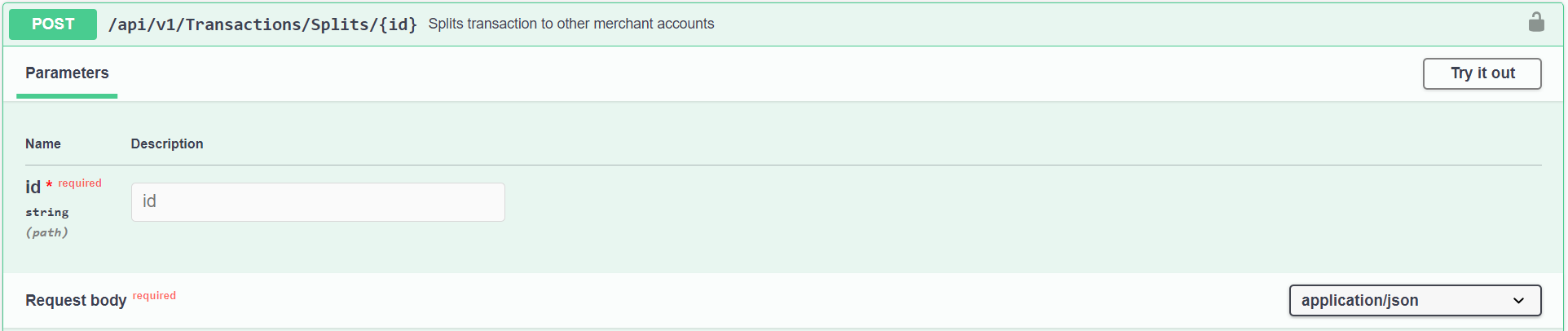
| Body Parameter | Type | Validation | Description | Example |
|---|---|---|---|---|
| amount required | integer | minimum: 100 | Values should be in cents or multiplied by 100. For example, MYR 10.00 should be inputed as 1000, and 1.00% should be inputed as 100 | 1000 |
| split_type required | string | Enum: [ abs, pct ] | Whether split should be absolute amount or percentage amount | abs |
| destination required | string | Payex Registered Merchant email for transaction split to | contact@payex.io | |
| type required | string | Type of split | platform | |
| description | string | Description of split | Platform commission fees |
A successful request returns a HTTP 200 status code with the following response parameters.
| Body Parameter | Type | Validation | Description | Example |
|---|---|---|---|---|
| status | string | Enum: [ 00, 99 ] | Status: 00 if create successfully Status: 99 if error occurred | |
| result | string | |||
| message | string | Success |
A bad request returns a HTTP 400 status code with the following response parameters.
| Body Parameter | Type | Validation | Description | Example |
|---|---|---|---|---|
| status | string | Enum: [ 00, 99 ] | Status: 00 if create successfully Status: 99 if error occurred | |
| result | string | |||
| message | string | Bad Request |
This endpoint provides the following functionalities:
- Subscriptions payment via online banking (bank account and credit card).
- Subscriptions payment via Visa/Mastercard (credit card, debit card, foreign card).

| Request Body Parameter | Type | Validation | Description | Example |
|---|---|---|---|---|
| customer_name | string | maxLength: 50 | Name of customer | Tan Boon Hua |
string($email) | maxLength: 50 | Email of customer | user@example.com | |
| merchant_reference_number | string | maxLength: 40 | You may input any reference number here | |
| id_type | integer | Enum: [ 1, 2, 3, 4, 5 ] | ID type of customer | 1 – New IC Number, 2 – Old IC Number, 3 – Passport Number, 4 – Business Registration, 5 – Others |
| id_number | string | maxLength: 18 | ID number of customer | 900525086780 |
| fpx_mode | string | Enum: [ 01, 02 ] | Whether or not the FPX user uses a retail or corporate bank account for FPX payment | 01 – retail, 02 – corporate |
| fpx_buyer_bank_id | string | maxLength: 10 | Bank code of FPX buyer | TEST0021 Refer to list of FPX buyer bank code |
| effective_date required | string($yyyyMMdd) | For example, 20/05/2023 means collect payment on every 20th of month. | 20/05/2023 | |
| expiry_date | string($yyyyMMdd) | You may leave it blank if you do not have a date (i.e. if you choose 30/12/2023, the last collection will fall on 20/12/2023) | ||
| max_amount | integer | minimum: 100 Cannot be lower than 100 (RM1.00) | This refers to the maximum amount of charge to be deducted (e.g. monthly/daily/ weekly). Values should be in cents. Example if MYR 10.00 should be inputed as 1000. Maximum of MYR 30,000.00 for FPX, and MYR 1,000,000.00 for FPX Corporate | 1000 |
| initial_amount | integer | minimum: 100 Cannot be lower than 100 (RM1.00) | This refers to upfront charge during authorization of mandate by customers. Only applicable when debit_type = “AD” (using cards). Specify initial charge of mandate, to be charged on authorization of mandate, outside of the specified collection schedule. Example, if create a mandate where auto is set to “false“ initial_amount is set to “1000″ max_amount is set to “20000“, merchant will charge immediately 1000 upfront, and every month will charge 20000. In other words, can for one-time-charges, upfront fees, etc. | 1000 |
| frequency required | string | Enum: [ DL, WK, MT, QR, YR ] | Frequency of deduction/charge. | DL – daily, WK – weekly, MT – monthly, QR – quarterly, YR – yearly |
| frequency_interval required | integer | minimum: 1 | Frequency of deduction/charge interval. ‘frequency_interval‘ = “3“, and ‘frequency‘ = “MT“, means every 3 months Example, if merchant wants to deduct twice a month to input ‘frequency_interval‘ = “2“, and ‘frequency‘ = “WK“. Note: If our frequency_interval does meet requirement, can create schedule on merchant end. | 1 |
| max_frequency required | integer | minimum: 1 maximum: 999 | Max number of charges within a collection cycle | 1 |
| purpose required | string | maxLength: 200 | Free-text field for any additional information regarding the purpose of payment. | Monthly subscription |
| debit_type | string | Enum: [ DD, AD ] | Omit parameter if allow customer to choose debit type. Specify debit type to determine debit type for customer | DD – direct debit (using bank account), AD – auto debit (using card) |
| return_url | string | maxLength: 150 | Upon payment, customers can click on a button e.g. return to merchant site. Return_url is the link where you want the customer to go back to after clicking the button. | <any valid domain> |
| callback_url | string | maxLength: 150 | URL to your server for Payex to update on mandate response | <any valid domain> |
| accept_url | string | maxLength: 150 | Redirect URL upon accepted payment. If not provided, return_url will be used by default. Note: This is for merchants who manually create payment link directly from Payex portal i.e. after payment is successful → where they want customers to be redirected to. | <any valid domain> |
| reject_url | string | maxLength: 150 | Redirect URL upon rejected payment. If not provided, return_url will be used by default. Note: This is for merchants who manually create payment link directly from Payex portal i.e. after payment is rejected → where they want customers to be redirected to. | <any valid domain> |
| address | string | maxLength: 200 | Address of customer | 48 Jalan Gembira, Taman Desa |
| postcode | string | maxLength: 10 | Postcode of customer | 57100 |
| city | string | maxLength: 150 | City of customer | Petaling Jaya |
| state | string | maxLength: 50 | State of customer | Selangor |
| country | string | maxLength: 2 | Country of customer | Malaysia |
| metadata | Any data as long as in the form of dictionary. | |||
| status | string | Enum: [ Pending, Draft ] | Pending | |
| auto | boolean | Enable this to auto collect every month | true | |
| retry | boolean | Enable this to let system auto retry if previous collection has failed | true | |
| retry_count | integer | maximum: 4 | 4 (the maximum retry count for system is 4) (i.e. payment failed to collect on 20th, system will retry on 21st, 22nd, 23rd & 24th) | 4 |
Create Mandates Response
A successful Mandate Request creation returns a HTTP 200 status code with the following response parameters.
| Body Parameter | Type | Validation | Description | Example |
|---|---|---|---|---|
| status | string | Enum: [ 00, 99 ] | Status Codes: – For mandate authorization, refer to Response Codes with Type = ‘FPX’ for Direct Debit and Response Codes with Type = ‘Card’ for Auto Debit – For auto debit collection, refer to Response Codes with Type = ‘Card’ – For direct debit collection, refer to Response Codes with Type = ‘BILLING’ | |
| result | | maxLength: 50 | ||
| status | string | Enum: [ 00, 99 ] | Status: 00 if create successfully Status: 99 if error occurred | |
| reference_number | string | <System generated> | ||
| key | string | <System generated> | ||
| url | string | <System generated> | ||
| error | string | <Error Description> | Invalid Data Format | |
| message | string | Success |
Create Mandate Response Codes
- For mandate authorization, refer to Response Codes with Type = ‘FPX’ for Direct Debit and Response Codes with Type = ‘Card’ for Auto Debit
- For auto debit collection, refer to Response Codes with Type = ‘Card’
- For direct debit collection, refer to Response Codes with Type = ‘BILLING’
Authorization Callback Response (Mandate Authorization Completion)
This refers to callback response upon mandate authorization completion (for both Direct Debit and Auto Debit) which will be sent via webhook to the specified callback_url. We will be using the charged by cards (Auto Debit) example below:
| Body Parameter | Type | Validation | Description | Example |
|---|---|---|---|---|
| amount | string | For authorization purpose and non-refundable | 1.00 | |
| currency | string | Currency | MYR | |
| customer_name | string | Name of Customer | Test Customer | |
| description | string | Free-text field for any additional information regarding the mandate authorization payment method. | Monthly Subscription Plan | |
| reference_number | string | Refers to mandate’s ‘merchant_reference_number’ passed by merchant as optional parameter. | <any string> | |
| mandate_reference_number | string | Refers to reference number for mandate generated by Payex | MN10000011621583965 | |
| payment_intent | string | This refers to Payment Intent endpoint for creating payment forms. | b96165b897c746c0a2a42032e8bfafea | |
| collection_id | string | Collection ID | owbnr7xq | |
| invoice_id | string | Invoice ID | ||
| txn_id | string | Transaction ID | PX10000011627008035 | |
| txn_date | string($yyyyMMddHHmmss) | Transaction Date | 20210723104035 | |
| external_txn_id | string | External Transaction ID | 2009151119230241 | |
| response | string | Description of auth_code | Approved | |
| auth_code | string | – For mandate authorization, refer to Response Codes with Type = ‘FPX’ for Direct Debit and Response Codes with Type = ‘Card’ for Auto Debit – For auto debit collection, refer to Response Codes with Type = ‘Card’ – For direct debit collection, refer to Response Codes with Type = ‘BILLING’ | 00 | |
| auth_number | string | Authorization Number | 15733223 | |
| fpx_mode | string | null | ||
| fpx_buyer_name | string | null | ||
| fpx_buyer_bank_id | string | null | ||
| fpx_buyer_bank_name | string | null | ||
| card_holder_name | string | N@me()/ .-_,&Buyer’`~*;: | ||
| card_number | string | 411111******1111 | ||
| card_expiry | string | 03/27 | ||
| card_brand | string | Can be any of “VISA”, “MASTERCARD”, “UNIONPAY” | VISA | |
| card_on_file | string | 64 alphanumeric key length | Type of “credential-on-file” / “card-on-file” payment for subsequent usage. Indicates future card-on-file usage where customer can save the card for future checkout. | 761d35566422d504c96a0f28f3637eeea0d9808a73897f533b53dd9850e4dfbb |
| signature | string | SHA512(secret + | + txn_id) | 3b0806197e8b948a81b2faff2839b3194b9f52707a336e5039a52204a2591abfbd5d4e5aceec4381b15cf0431e02aa6e2c9d17c255e6e7083e47ccfe c182cbaa | |
| txn_type | string | Enum: [ Mandate – Authorization, Auto Debit – Authorization, Malaysia Debit Card, Malaysia Credit Card, Foreign Card ] | Used to differentiate between different callback responses (refer to the list below) List of available ‘txn_type’ for callback 1. Mandate – Authorization 2. Auto Debit – Authorization 3. Mandate – Approval 4. Malaysian Debit Card 5. Malaysian Credit Card 6. Foreign Card When ‘txn_type’ is either of ‘Mandate – Authorization’ will incur a non-refundable amount of MYR 1.00 to your customer | Auto Debit – Authorization |
| nonce | string | lenKjMY3VInjYHmtSX398aT2socMZGCOkLIQ8OPPeIaerXSVRW0Arzd33dLnd5M8 |
Approval Callback (Mandate Approval for Direct Debit only)
This refers to response upon mandate approval completion which will be sent via webhook to the specified callback_url. There’s two callback for Direct Debit, as first callback is for customer authorization while second callback is for bank approval.
| Body Parameter | Type | Validation | Description | Example |
|---|---|---|---|---|
| application_type | string | Refer to mandate authorization, maintenance or rejection. | 01 | |
| approval_status | string | Mandate approval status | 00 | |
| approval_date | string | Mandate approval date | 20210721 | |
| txn_id | string | Transaction ID of Payex | PX10000171626952548 | |
| reference_number | string | Refers to mandate’s ‘merchant_reference_number’ passed by merchant as optional parameter. | <any string> | |
| mandate_reference_number | string | Refers to reference number for mandate generated by Payex | MN10000171626860885 | |
| record_number | string | Refers to bank reference number | E-20210721Q964879 | |
| fpx_mode | string | Enum: [ 01, 02 ] | Whether or not the customer uses a retail or corporate bank account for FPX payment | 01 – Retail, 02 – Corporate |
| fpx_buyer_name | string | Name of FPX buyer | N@me()/ .-_,&Buyer’`~*;: | |
| fpx_buyer_bank_name | string | Bank name of FPX buyer | CIMB Bank | |
| fpx_buyer_bank_account | string | Bank account of FPX buyer | ********1234 | |
| signature | string | 68f21dfb966f264dbd996ad809828b8e763bc5798fbefb5ada434af3 c6a87873d525f7066c5b9e9963ef676f2e672d2835779bc59b09522 3a43058dc935b04f3 | ||
| txn_type | string | Enum: [ Mandate – Approval ] | This is applicable to Direct Debit only. | Mandate – Approval |
Get Mandate Response
This endpoint allows you to retrieve the details of mandate payment by the following parameters (optional fields):

Note: Limit is how many rows to get, for example, 10 limit means will return up to 10 rows, and 10 limit and page 2, means rows 11 to 20 of the results
If successful, this endpoint returns HTTP 200 status code with the following response parameters.
| Body Parameter | Type | Validation | Description | Example |
|---|---|---|---|---|
| status | string | Enum: [ 00, 99 ] | Status Codes: – For mandate authorization, refer to Response Codes with Type = ‘FPX’ for Direct Debit and Response Codes with Type = ‘Card’ for Auto Debit | |
| result id | integer | |||
| date | string($yyyyMMddHHmmss) | Date when mandate is created | ||
| mid | string | Merchant ID | ||
| name | string | Name of merchant | ||
| title | string | |||
| collection_id | string | Collection ID | owbnr7xq | |
| customer_name | string | Name of Customer | Test Customer | |
| contact_number | string | Contact number of Customer | 0123456789 | |
string | Email of Customer | test@payex.io | ||
| txn_id | string | Transaction ID of Payex | PX10000171626952548 | |
| reference_number | string | Refers to reference number for mandate generated by Payex | MN10000171626860885 | |
| merchant_reference_number | string | Refers to mandate’s ‘merchant_reference_number’ passed by merchant as optional parameter. | <any string> | |
| record_number | string | Refers to bank reference number | E-20210721Q964879 | |
| status_code | string | Enum: [ 01, 02, 03, 04, 05, 06, 07 ] | Status code of mandate authorisation | 02 |
| status | string | Enum: [ Draft, Pending Authorization, Pending Approval, Approved, Rejected, Terminated, Expiry ] | Status of mandate authorisation by customer | Pending Authorization |
| approval_status_code | string | Status code of approval | 00 | |
| approval_status | string | Status of approval | Approved | |
| currency | string | Currency | MYR | |
| max_amount | number($double) | minimum: 100 | This refers to the maximum amount of charge to be deducted. | RM500 |
| amount | number($double) | For authorization purpose and non-refundable | RM1.00 | |
| fpx_mode | string | Enum: [ 01, 02 ] | Whether or not the customer uses a retail or corporate bank account for FPX payment | 01 – retail, 02 – corporate |
| fpx_buyer_bank_id | string | maxLength: 10 | Bank code of FPX buyer | TEST0021 Refer to list of FPX buyer bank code |
| fpx_buyer_bank_name | string | Bank name of FPX buyer | CIMB Bank | |
| fpx_buyer_name | string | Name of FPX buyer | N@me()/ .-_,&Buyer’`~*;: | |
| fpx_buyer_bank_account | string | Bank account of FPX buyer | ********1234 | |
| card_holder_name | string | Cardholder name | N@me()/ .-_,&Buyer’`~*;: | |
| card_number | string | Card number | 411111******1111 | |
| card_expiry | string | Card expiration date | 03/27 | |
| card_brand | string | Can be any of “VISA”, “MASTERCARD”, “UNIONPAY” | VISA | |
| card_type | string | Type of card used for auto debit | Debit or Credit | |
| card_id | string | 64 characters unique identifier | ID of the store card on file, similar to card_on_file Type of “credential-on-file” / “card-on-file” payment for subsequent usage. Indicates future card-on-file usage where customer can save the card for future checkout. | 761d35566422d504c96a0f28f3637eeea0d9808a73897f533b53dd9850e4dfbb |
| id_type | string | Enum: [ 1, 2, 3, 4, 5 ] | ID type of customer | 1 – New IC Number, 2 – Old IC Number, 3 – Passport Number, 4 – Business Registration, 5 – Others |
| id_number | string | ID number of customer | 900525086780 | |
| address | string | Address of customer | 48 Jalan Gembira Taman Mega | |
| postcode | string | Postcode of customer | 57100 | |
| city | string | City of customer | Petaling Jaya | |
| state | string | State of customer | Selangor | |
| country | string | Country of customer | Malaysia | |
| effective_date | string($yyyyMMdd) | For example, 20/05/2023 means collect payment on every 20th of month. | 20/05/2023 | |
| expiry_date | string($yyyyMMdd) | You may leave it blank if you do not have a date (i.e. if you choose 30/12/2023, the last collection will fall on 20/12/2023) | 30/12/2023 | |
| frequency | string | Enum: [ DL, WK, MT, QR, YR ] | Frequency of deduction/charge | DL – daily, WK – weekly, MT – monthly, QR – quarterly, YR – yearly |
| frequency_interval | integer | ‘frequency_interval’ = 3, and ‘frequency’ = “MT”, means every 3 months | 1 | |
| max_frequency | integer | Max number of charges within a collection cycle | 1 | |
| day | integer | minimum: 0 maximum: 31 | Day of mandate creation | |
| month | integer | minimum: 1 maximum: 12 | Month of mandate creation | |
| purpose | string | maxLength: 200 | Purpose of payment | Monthly Subscription |
| debit_type | string | Enum: [ DD, AD ] | Type of mandate | DD – direct debit, AD – auto debit |
| active | boolean | Enable this to make active or active the mandate | true | |
| auto | boolean | Enable this to auto collect every month | true | |
| retry | boolean | Enable this to let system auto retry if previous collection has failed | true | |
| retry_count | integer | 4 | 4 (the maximum retry count for system is 4) (i.e. payment failed to collect on 20th, system will retry on 21st, 22nd, 23rd & 24th) | 4 |
| metadata | { } | Any data as long as in the form of dictionary | ||
| key | string | <System generated> | ||
| message | string | Success | ||
| total_pages | integer |
Update Mandates Request
This endpoint allows you to update mandates (only in Draft status) that have been created using ‘reference_number’ as the request parameter below (required field):
‘reference_number’ refers to reference number for mandate generated by Payex (e.g. MN10000171626860885)

| Request Body Parameter | Type | Validation | Description | Example |
|---|---|---|---|---|
| customer_name required | string | maxLength: 50 | Name of Customer | Test Customer |
| email required | string($email) | maxLength: 50 | Email of Customer | test@payex.io |
| contact_number | string | maxLength: 20 | Contact Number of Customer | 0123456789 |
| id_type | integer | Enum: [ 1, 2, 3, 4, 5 ] | ID Type of Customer | 1 – New IC Number, 2 – Old IC Number, 3 – Passport Number, 4 – Business Registration, 5 – Others |
| id_number | string | maxLength: 18 | ID Number of Customer | 900525086780 |
| fpx_mode | string | Enum: [ 01, 02 ] | Whether or not the customer uses a retail or corporate bank account for FPX payment | 01 – retail, 02 – corporate |
| fpx_buyer_bank_id | string | maxLength: 10 | Bank code of FPX buyer | Refer to list of FPX buyer bank code |
| effective_date required | string($yyyyMMdd) | yyyyMMdd | For example, 20/05/2023 means collect payment on every 20th of month. | 20/05/2023 |
| expiry_date | string($yyyyMMdd) | yyyyMMdd | You may leave it blank if you do not have a date (i.e. if you choose 30/12/2023, the last collection will fall on 20/12/2023) | 30/12/2023 |
| max_amount | integer | minimum: 100 | Values should be in cents. Example if MYR 10.00 should be inputed as 1000. Maximum of MYR 30,000.00 for FPX, and MYR 1,000,000.00 for FPX Corporate | 1000 |
| initial_amount | integer | minimum: 100 | Only applicable when debit_type = “AD” | |
| frequency required | string | Enum: [ DL, WK, MT, QR, YR ] | Frequency of deduction/charge | DL – daily, WK – weekly, MT – monthly, QR – quarterly, YR – yearly |
| frequency_interval required | integer | minimum: 1 | ‘frequency_interval’ = 3, and ‘frequency’ = “MT”, means every 3 months | 1 |
| max_frequency required | integer | minimum: 1 maximum: 999 | Max number of charges within a collection cycle | 1 |
| purpose required | string | maxLength: 200 | Purpose of payment | Monthly Subscription |
| debit_type | string | Enum: [ DD, AD ] | Only applicable when debit_type = “AD”. Specify initial charge of mandate, to be charged on authorization of mandate, outside of the specified collection schedule. Can use used for one-time-charges, upfront fees, etc. | DD – direct debit, AD – auto debit |
| status | string | Enum: [ Draft ] | Only “Draft” status of mandate can be updated. | Draft |
| auto | boolean | Enable this to auto collect every month. If auto is set to false, | true | |
| retry | boolean | Enable this to let system auto retry if previous collection has failed | true | |
| retry_count | integer | maximum: 4 | 4 (the maximum retry count for system is 4) (i.e. payment failed to collect on 20th, system will retry on 21st, 22nd, 23rd & 24th) | 4 |
| metadata | Any data as long as in the form of dictionary |
A successful Update Mandate Request will return a HTTP 200 status code with the following response parameters.
| Body Parameter | Type | Validation | Description | Example |
|---|---|---|---|---|
| status | string | Enum: [ 00, 99 ] | Status Codes: – For mandate authorization, refer to Response Codes with Type = ‘FPX’ for Direct Debit and Response Codes with Type = ‘Card’ for Auto Debit | |
| result status | string | Enum: [ 00, 99 ] | Status: 00 if create successfully Status: 99 if error occurred | 00 |
| reference_number | string | Refers to reference number for mandate generated by Payex | MN10000171626860885 | |
| key | string | <System generated> | ||
| url | string | <System generated> When update requires customers’ authorization. | ||
| error | string | <Error Description> | Invalid Data Format | |
| message | string | Success |
Delete Mandates Request
This endpoint allows you to delete mandates using reference_number as the request parameter below (required field):
‘reference_number’ refers to reference number for mandate generated by Payex (e.g. MN10000171626860885)

Note: reference_number is the required parameter for this endpoint and it refers to a list/array of reference numbers for mandate generated by Payex. You may choose to delete multiple mandates at a time and the parameter format will be [“MNxxxx”,”MNxxxx”].
A successful Delete Mandates will return a HTTP 200 status code with the following response parameters.
| Body Parameter | Type | Validation | Description | Example |
|---|---|---|---|---|
| status | string | Enum: [ 00, 99 ] | Status Codes: – For mandate authorization, refer to Response Codes with Type = ‘FPX’ for Direct Debit and Response Codes with Type = ‘Card’ for Auto Debit | |
| result status | string | Enum: [ 00, 99 ] | Status: 00 if create successfully Status: 99 if error occurred | 00 |
| reference_number | string | Refers to reference number for mandate generated by Payex | MN10000171626860885 | |
| key | string | <System generated> | ||
| url | string | <System generated> When termination requires customers’ authorization. | ||
| error | string | <Error Description> | Invalid Data Format | |
| message | string | Success |
Update Mandate Collection Settings Request
This endpoint allows you to update mandate collection settings with ‘reference_number’ as required parameter:
‘reference_number’ refers to reference number for mandate generated by Payex (e.g. MN10000171626860885)

| Body Parameter | Type | Validation | Description | Example |
|---|---|---|---|---|
| amount | integer | minimum: 100 | For example, if max amount was set as rm100, then here can set to any amount less or equal to max amount for the auto collection. | 100 |
| day | integer | minimum: 0 maximum: 31 | Day of mandate | |
| month | integer | minimum: 1 maximum: 12 | Month of mandate | |
| active | boolean | Enable this to make active or inactive the mandate | true | |
| auto | boolean | Enable this to auto collect every month. If auto is set to false, Payex will wait for merchant’s instructions before next deduction. | true | |
| retry | boolean | Enable this to let system auto retry if previous collection has failed | true | |
| retry_count | integer | maximum: 4 | 4 (the maximum retry count for system is 4) (i.e. payment failed to collect on 20th, system will retry on 21st, 22nd, 23rd & 24th) | 4 |
A successful Update Mandate Collection Settings Request will return a HTTP 200 status code with the following response parameters.
| Body Parameter | Type | Validation | Description | Example |
|---|---|---|---|---|
| status | string | Enum: [ 00, 99 ] | ||
| result | string | List [] | ||
| message | string |
Create Collections Request
This endpoint allows you to create collection request upon authorisation of mandate by your customers.

| Body Parameter | Type | Validation | Description | Example |
|---|---|---|---|---|
| reference_number required | string | Refers to reference number for mandate generated by Payex | MN10000011621583965 | |
| collection_reference_number | string | Passed by merchant as optional parameter | <any string> | |
| collection_date required | string($yyyyMMdd) | Date of collection | ||
| amount | integer | Values should be in cents. For example, MYR 10.00 should be inputed as 1000. Value must be less than or equal to “max_amount” of mandate. Maximum of MYR 30,000.00 for FPX, and MYR 1,000,000.00 for FPX Corporate. | ||
| retry | boolean | Enable this to let system auto retry if previous collection has failed | true | |
| retry_count | integer | max: 4 | 4 (the maximum retry count for system is 4) (i.e. payment failed to collect on 20th, system will retry on 21st, 22nd, 23rd & 24th) | |
| metadata | Any data as long as in the form of dictionary |
A successful Create Collection Request will return a HTTP 200 status code with the following response parameters.
| Body Parameter | Type | Validation | Description | Example |
|---|---|---|---|---|
| status | string | Enum: [ 00, 99 ] | – For auto debit collection, refer to Response Codes with Type = ‘Card’ – For direct debit collection, refer to Response Codes with Type = ‘BILLING’ | |
| result status | string | Enum: [ 00, 99 ] | Status: 00 if create successfully Status: 99 if error occurred | |
| reference_number | string | Refers to reference number for mandate generated by Payex | MN10000011621583965 | |
| collection_number | string | Refers to collection number generated by Payex | CL10000023077b6050c4 | |
| error | string | <Error Description> | Invalid Data Format | |
| message | string |
Collection Callback
Response upon mandate collection completion which will be sent via webhook to the specified callback_url.
| Body Parameter | Type | Validation | Description | Example |
|---|---|---|---|---|
| collection_status | string | Direct Debit (Refer to BILLING response codes) and Auto Debit (Refer to Card response codes) | Approved | |
| collection_date | string | Date of Collection | 15/01/2023 | |
| txn_id | string | Transaction ID of Payex | PX10000171626952548 | |
| mandate_reference_number | string | Refers to reference number for mandate generated by Payex | MN10000171626860885 | |
| reference_number | string | Refers to mandate’s ‘merchant_reference_number’ passed by merchant as optional parameter. | <any string> | |
| batch_number | string | Batch number is unique number for the batch of collections submitted to bank | ||
| collection_number | string | Refers to collection number generated by Payex | CL10000023077b6050c4 | |
| collection_reference_number | string | Passed by merchant as optional parameter | <any string> | |
| amount | string | Values should be in cents. For example, MYR 10.00 should be inputed as 1000. Value must be less than or equal to “max_amount” of mandate. Maximum of MYR 30,000.00 for FPX, and MYR 1,000,000.00 for FPX Corporate. | ||
| signature | string | SHA512(secret + | + txn_id) | 3b0806197e8b948a81b2faff2839b3194b9f52707a336e5039a52204a2591abfbd5d4e5aceec4381b15cf0431e02aa6e2c9d17c255e6e7083e47ccfe c182cbaa | |
| txn_type | string | Enum: [ Direct Debit, Malaysia Debit Card, Malaysia Credit Card, Foreign Card ] | Transaction Type |
Read Collections Response
This endpoint allows you to read collections by the following parameters (optional fields):

| Body Parameter | Type | Validation | Description | Example |
|---|---|---|---|---|
| status | string | Enum: [ 00, 99 ] | ||
| result id | integer | |||
| date | string($yyyyMMddHHmmss) | |||
| collection_date | string($yyyyMMdd) | Date of Collection | 15/01/2023 | |
| reference_number | | Refers to reference number for mandate generated by Payex | MN10000171626860885 | |
| merchant_reference_number | integer | Refers to mandate’s ‘merchant_reference_number’ passed by merchant as optional parameter. | <any string> | |
| batch_number | integer | Batch number is unique number for the batch of collections submitted to bank | ||
| collection_number | | Refers to collection number generated by Payex | CL10000023077b6050c4 | |
| collection_reference_number | | Passed by merchant as optional parameter | <any string> | |
| amount | | For example, if max amount was set as rm100, then here will be any amount less or equal to max amount for the auto collection. | ||
| batch_status_code | | Refers to batch status code under Batch response codes | 01 | |
| batch_status | | Refers to batch status under Batch response codes | Pending | |
| collection_status_code | | Status code of collection | 00 | |
| collection_status | | Direct Debit (Refer to BILLING response codes) and Auto Debit (Refer to Card response codes) | Approved | |
| auto | | Enable this to auto collect every month. If auto is set to false, Payex will wait for merchant’s instructions before next deduction. | true | |
| retry | | Enable this to let system auto retry if previous collection has failed | true | |
| retry_count | | maximum: 4 | 4 (the maximum retry count for system is 4) (i.e. payment failed to collect on 20th, system will retry on 21st, 22nd, 23rd & 24th) | 4 |
| retry_left | | Number of retry remaining | 3 | |
| retry_date | | Date of retry | ||
| metadata | Any data as long as in the form of dictionary | |||
| message | | Success | ||
| total_pages | |
Delete Collections Response
This endpoint allows you to delete collections with ‘collection_number’ as the required parameter below:

A successful Delete Collection will return a HTTP 200 status code with the following response parameters.
| Body Parameter | Type | Validation | Description | Example |
|---|---|---|---|---|
| status | | Enum: [ 00, 99 ] | ||
| result status | | Enum: [ 00, 99 ] | ||
| reference_number | | Refers to reference number for mandate generated by Payex | MN10000171626860885 | |
| collection_number | | Refers to collection number generated by Payex | CL10000023077b6050c4 | |
| error | | <Error Description> | Invalid Data Format | |
| message | | Success |
Ensure that you already have a Payex account. You may register here or checkout our Activation page, if otherwise. Once you’ve registered and provided your business documents, your account will be automatically enabled for integration testing access.
Create a mandate
Fire a POST request to /api/v1/Mandates with the required parameters.
// sample request body
[
  {
    "customer_name": "John Doe",
    "email": "user@example.com",
    "contact_number": "0123456789",
    "merchant_reference_number": "string",
    "id_type": "1",
    "id_number": "900825086780",
    "fpx_mode": "01",
    "fpx_buyer_bank_id": "900825086780",
    "effective_date": "yyyyMMdd",
    "expiry_date": "yyyyMMdd",
    "max_amount": "1000",
    "initial_amount": "1000",
    "frequency": "MT"
    "max_frequency": "1",
    "purpose": "Monthly Subscription Plan",
    "debit_type": "DD",
    "return_url": "<any valid domain>",
    "callback_url": "<any valid domain>",
    "accept_url": "<any valid domain>",
    "reject_url": "<any valid domain>",
    "address": "48 Jalan Gembira Taman Desa",
    "postcode": "57100",
    "city": "Petaling Jaya",
    "state": "Selangor",
    "country": "Malaysia",
    "status": "Pending",
    "auto": true,
    "retry": true,
    "retry_count": 0
  }
]
If all inputs validation and general inputs handling are valid, you’ll receive a SUCCESS response from Payex
{
  "status": "00",
  "result":
  [
    {  // create successfully
       "status": "00",
       "reference_number": "<system_generated>",
       "key": "<system_generated>",
       "url": "<system_generated>"
    },
    {  // error occurred
        "status": "99",
        "error": "<error_description>"
    },
    ...
  ],
  "message": "Success"
}
What to take note
- You only have to provide one callback url and we will send different responses to it
- ‘txn_type’ is used to differentiate between different callback responses. List of available ‘txn_type’ for callback as below:
- Mandate – Authorization
- Auto Debit – Authorization
- Mandate – Approval
- Malaysian Debit Card
- Malaysian Credit Card
- Foreign Card
- Direct Debit mandate: There’s two callbacks, first callback is for customer authorization and second callback is for bank approval
- If the customer did not click the payment link, status will be “Pending“
- If the customer clicks the payment link and fills out relevant information and click “Proceed” customer will receive email notification on authorisation.
- Upon successful collection of 1st payment, customer will receive another email notification.
- Auto Debit mandate: There’s only one callback for authorization and approval at the same time.
- If the customer clicks the payment link, the 1st instalment will be collected on the effective date.
- If you wish to instantly charge customer the 1st instalment during authorisation, include the ‘initial_amount’ parameter.
- There will be a one-time charge of RM 1 (via bank account) for the purpose of account verification and it takes 1 working day to be approved by RHB
- There will be no charge (via local / foreign cards) for the purpose of account verification and it is instant approval by Visa/Mastercard
- Once it has been approved by RHB or Visa/Mastercard then you can start collecting payment from your customers.
What to do next (for success case)
- Send mandate link to your customer for authorization
- Customer fills out relevant information and submits (Day t)
- Wait for Mandate Authorization Callback (Day t)
Direct Debit
Callback for customer authorization
Mandate - Authorization Callback Response (Day t)-> Wait for Mandate Approval Callback (Day t + 1 – Next working day after submission){ "amount": "1.00", "currency": "MYR", "customer_name": "Test Customer", "description": "Monthly Subscription Plan", "mandate_reference_number": "MN10000011621583965", "payment_intent": "b96165b897c746c0a2a42032e8bfafea", "collection_id": "owbnr7xq", "invoice_id": "", "txn_id": "PX10000011627008035", "external_txn_id": "2009151119230241", "response": "Approved", "auth_code": "00", "auth_number": "15733223", "txn_date": "20210723104035", "fpx_mode": "01", "fpx_buyer_name": "N@me()/ .-_,&Buyer'`~*;:", "fpx_buyer_bank_id": "TEST0021", "fpx_buyer_bank_name": "SBI BANK A", "card_holder_name": null, "card_number": null, "card_brand": null, "signature": "3b0806197e8b948a81b2faff2839b3194b9f52707a336e5039a522 04a2591abfbd5d4e5aceec4381b15cf0431e02aa6e2c9d17c255e6e7083e47ccfe c182cbaa", "txn_type": "Mandate - Authorization", "nonce": "lenKjMY3VInjYHmtSX398aT2socMZGCOkLIQ8OPPeIaerXSVRW0A rzd33dLnd5M8" }
Callback for bank approval
Mandate Approval Callback Response{ "application_type": "01", "approval_status": "00", "approval_date": "20210721", "txn_id": "PX10000171626952548", "reference_number": "MN10000171626860885", "record_number": "E-20210721Q964879", "fpx_mode": "01", "fpx_buyer_name": "N@me()/ .-_,&Buyer'`~*;:", "fpx_buyer_bank_name": "SBI BANK A", "fpx_buyer_bank_account": "********1234", "signature": "68f21dfb966f264dbd996ad809828b8e763bc5798fbefb5ada434af3 c6a87873d525f7066c5b9e9963ef676f2e672d2835779bc59b09522 3a43058dc935b04f3", "txn_type": "Mandate - Approval" }-> Create Collection Settings for next collection at Day t + 2
Auto Debit
]]>
Auto Debit - Authorization Callback Response (Day t)
- If ‘initial_amount‘ > RM1.00
{
    "amount": "88.00",
    "currency": "MYR",
    "customer_name": "Test Customer",
    "description": "Monthly Subscription Plan",
    "reference_number": "MN10000011621583965",
    "payment_intent": "b96165b897c746c0a2a42032e8bfafea",
    "collection_id": "owbnr7xq",
    "invoice_id": "",
    "txn_id": "PX10000011627008035",
    "external_txn_id": "2009151119230241",
    "response": "Approved",
    "auth_code": "00",
    "auth_number": "15733223",
    "txn_date": "20210723104035",
    "fpx_mode": null,
    "fpx_buyer_name": null,
    "fpx_buyer_bank_id": null,
    "fpx_buyer_bank_name": null,
    "card_holder_name": "N@me()/ .-_,&Buyer'`~*;:",
    "card_number": "411111******1111",
    "card_brand": "VISA",
    "card_on_file": "761d35566422d504c96a0f28f3637eeea0d9808a73897f533b5
3dd9850e4dfbb",
    "signature": "3b0806197e8b948a81b2faff2839b3194b9f52707a336e5039a522
04a2591abfbd5d4e5aceec4381b15cf0431e02aa6e2c9d17c255e6e7083e47ccfe
c182cbaa",
    "txn_type": "Malaysian Debit Card",
    "nonce": "lenKjMY3VInjYHmtSX398aT2socMZGCOkLIQ8OPPeIaerXSVRW0A
rzd33dLnd5M8"
}
-> System created Collection Settings for you automatically at Day t
- If ‘initial_amount‘ < RM1.00
-> Create Collection Settings for next collection at Day t{ "amount": "1.00", "currency": "MYR", "customer_name": "Test Customer", "description": "Monthly Subscription Plan", "reference_number": "MN10000011621583965", "payment_intent": "b96165b897c746c0a2a42032e8bfafea", "collection_id": "owbnr7xq", "invoice_id": "", "txn_id": "PX10000011627008035", "external_txn_id": "2009151119230241", "response": "Approved", "auth_code": "00", "auth_number": "15733223", "txn_date": "20210723104035", "fpx_mode": null, "fpx_buyer_name": null, "fpx_buyer_bank_id": null, "fpx_buyer_bank_name": null, "card_holder_name": "N@me()/ .-_,&Buyer'`~*;:", "card_number": "411111******1111", "card_brand": "VISA", "card_on_file": "761d35566422d504c96a0f28f3637eeea0d9808a73897f533b5 3dd9850e4dfbb", "signature": "3b0806197e8b948a81b2faff2839b3194b9f52707a336e5039a522 04a2591abfbd5d4e5aceec4381b15cf0431e02aa6e2c9d17c255e6e7083e47ccfe c182cbaa", "txn_type": "Auto Debit - Authorization", "nonce": "lenKjMY3VInjYHmtSX398aT2socMZGCOkLIQ8OPPeIaerXSVRW0A rzd33dLnd5M8" }
i) For this example, we will pretend to be a merchant that wants to collect a fixed amount for the first 23 months, followed by collection of different amount only for the final month.
- I have created a Direct Debit mandate for 24 months, where each month collection is fixed at RM300.00.
- Now I need to collect only RM150.50 for the final month. How can I update it for the final month via Payex API?
Few ways to do it via Update Mandate Collection Settings Request endpoint /api/v1/mandates/collectionSettings/reference_number:
Option 1: Mandate setting for auto collection to ‘false’
- If auto = false, Payex will wait for your instructions before next deduction
- You would need to create one mandate and 24 collections
- Create collections for 23 months for RM300.00, and final month RM150.50
Option 2: Mandate setting for auto collection to ‘true’
- If auto = true, system will auto collect every month
- After 23rd month collection or before 24th month collection, you need to change collection amount to RM150.50
Option 3: Mandate setting for auto collection to ‘true’
- If auto = true, system will auto collect every month
- Create collection for the 24th month for RM150.50, then Payex auto collection schedule will skip the 24th month when the time comes
- For example, if mandate’s effective date 1st Jan 2024, for 24 months period the last collection will be 1st Dec 2025. So, you need to create collection for 1st Dec 2025 as RM150.50, the rest of months will follow auto collection schedule.
ii) For this example, we will pretend to be a merchant that wants to collect a different amount only for the first month, followed by a fixed amount for the next 11 months.
Few ways to do it via Create Mandate Request endpoint /api/v1/Mandates:
Option 1: Mandate for auto collection to ‘false’
- Call create mandates endpoint to authorise (max amount = RM300, auto=false)
- Call create collection endpoint to collect RM100 for 1st month
- Call create collection endpoint to collect RM300 for 2nd to 12month
Option 2: Mandate for auto collection to ‘true’
- Call create mandates endpoint to authorise (max amount = RM300, auto=true)
- Call create collection endpoint to collect RM100 for 1st month
- RM300 collection will be auto created for 2nd to 12month
Option 3: Mandate for auto collection to ‘true’
- Call create mandates endpoint to authorise (max amount = RM300, auto=true)
- Call payment intent endpoint to collect RM100 for 1st month using one time payment
- RM300 collection will be auto created for 2nd to 12month
Scenario B: Terminate collection halfway through
For this example, we will pretend to be a merchant that wants to stop all collection from the customer who has decided to pay down all dues / early settle the outstanding amount
- I have created a Direct Debit mandate for 60 months, where each month collection is fixed at RM300.00.
- Customer started paying for January and in February decides to pay down all outstanding amount. Which API can I use to instruct Payex to stop collecting funds from my customer in March onwards?
Option 1: Use Update Mandate Collection Settings Request endpoint
/api/v1/mandates/collectionSettings/reference_number
curl --location --request PUT '/api/v1/Mandates/CollectionSettings/MNxxxxx' \
--header 'Content-Type: application/json' \
--header 'Authorization: Bearer xxx' \
--data '{
    "active": false
}'- Note: Reference number is path instead of query param
Option 2: Use Delete Mandates Request endpoint
- If delete mandate then all collections under the mandate will be deactivated
- You can still delete mandates although some collections are active
- Delete mandate endpoint will need customer to authorise the termination link
Scenario C: Collect at varying dates for different customers
For this example, we will pretend to be a merchant that wants to initiate two types of subscription plan depending on the customer’s subscription start date
- Subscription Plan A: When customer subscribes on any date between 1st to 29th April; the next payment i.e. 2nd payment = 1st May
- Through Payex API
- Set the param “day” to whichever day of month as anchor day, so if 1st of May then set day=1
- Effective date can remain as any date from 1st to 29th April (e.g. 20240415). So next billing will be 1st of every month.
- Once setup, Payex system will automatically charge the customer if the setting for auto=true
- Alternatively if auto=false, then you can send collection request to Payex on whichever date and Payex will process accordingly
- Subscription Plan B: When customer subscribes on 30th April (last day of the month); the next payment i.e. 2nd payment = 1st June
- Option 1: You will have to call Payex API to make “inactive” the mandate and activate again on 1st June
- Option 2: For these types of non-standard collection schedule, will be better to use your own schedule (set auto=false)
See more:
]]>FPX
| Response Code | Status |
|---|---|
| 00 | Approved |
| 03 | Invalid Merchant |
| 05 | Invalid Seller Or Acquiring Bank Code |
| 09 | Transaction Pending |
| 12 | Invalid Transaction |
| 13 | Invalid Amount |
| 14 | Invalid Buyer Account |
| 1A | Buyer Session Timeout At Internet Banking Login Page |
| 1B | Buyer Failed To Provide The Necessary Info To Login To Internet Banking Login Page |
| 1C | Buyer Choose Cancel At Login Page |
| 1D | Buyer Session Timeout At Account Selection Page |
| 1E | Buyer Failed To Provide The Necessary Info At Account Selection Page |
| 1F | Buyer Choose Cancel At Account Selection Page |
| 1G | Buyer Session Timeout At TAC Request Page |
| 1H | Buyer Failed To Provide The Necessary Info At TAC Request Page |
| 1I | Buyer Choose Cancel At TAC Request Page |
| 1J | Buyer Session Timeout At Confirmation Page |
| 1K | Buyer Failed To Provide The Necessary Info At Confirmation Page |
| 1L | Buyer Choose Cancel At Confirmation Page |
| 1M | Internet Banking Session Timeout |
| 20 | Invalid Response |
| 2A | Transaction Amount Is Lower Than Minimum Limit |
| 2X | Transaction Is Canceled By Merchant |
| 30 | Format Error |
| 31 | Invalid Bank |
| 39 | No Credit Account |
| 45 | Duplicate Seller Order Number |
| 46 | Invalid Seller Exchange Or Seller |
| 47 | Invalid Currency |
| 48 | Maximum Transaction Limit Exceeded |
| 49 | Merchant Specific Limit Exceeded |
| 50 | Invalid Seller for Merchant Specific Limit |
| 51 | Insufficient Funds |
| 53 | No Buyer Account Number |
| 57 | Transaction Not Permitted |
| 58 | Transaction To Merchant Not Permitted |
| 70 | Invalid Serial Number |
| 76 | Transaction Not Found |
| 77 | Invalid Buyer Name Or Buyer ID |
| 78 | Decryption Failed |
| 79 | Host Decline When Down |
| 80 | Buyer Cancel Transaction |
| 83 | Invalid Transaction Model |
| 84 | Invalid Transaction Type |
| 85 | Internal Error At Bank System |
| 87 | Debit Failed Exception Handling |
| 88 | Credit Failed Exception Handling |
| 89 | Transaction Not Received Exception Handling |
| 90 | Bank Internet Banking Unavailable |
| 92 | Invalid Buyer Bank |
| 96 | System Malfunction |
| 98 | MAC Error |
| 99 | Pending Authorization (Applicable for B2B model) |
| BB | Blocked Bank |
| BC | Transaction Cancelled by Customer |
| DA | Invalid Application Type |
| DB | Invalid Email Format |
| DC | Invalid Maximum Frequency |
| DD | Invalid Frequency Mode |
| DE | Invalid Expiry Date |
| DF | Invalid e-Mandate Buyer Bank ID |
| FE | Internal Error |
| OE | Transaction Rejected As Not In FPX Operating Hours |
| OF | Transaction Timeout |
| SB | Invalid Acquiring Bank Code |
| XA | Invalid Source IP Address (Applicable for B2B2 model) |
| XB | Invalid Seller Exchange IP |
| XC | Seller Exchange Encryption Error |
| XE | Invalid Message |
| XF | Invalid Number Of Orders |
| XI | Invalid Seller Exchange |
| XM | Invalid FPX Transaction Model |
| XN | Transaction Rejected Due To Duplicate Seller Exchange Order Number |
| XO | Duplicate Exchange Order Number |
| XS | Seller Does Not Belong To Exchange |
| XT | Invalid Transaction Type |
| XW | Seller Exchange Date Difference Exceeded |
Card
Note: This is applicable for one-time card payment, credit card instalment payment and auto debit (subscription payment).
| Response Code | Status |
|---|---|
| 00 | Approved |
| 01 | Refer To Issuer |
| 02 | Refer To Issuer, special condition |
| 03 | Invalid Merchant ID |
| 04 | Pick Up Card |
| 05 | Do Not Honour |
| 06 | Error |
| 07 | Pick Up Card, special condition |
| 08 | Check Signature/Id or Honor with ID |
| 10 | Partial Approval |
| 11 | VIP Approval |
| 12 | Invalid Transaction |
| 13 | Invalid Amount |
| 14 | Invalid Card No |
| 15 | Invalid Issuer |
| 16 | Approved to update track 3 (Reserved) |
| 17 | Customer Cancellation (Reversal only) |
| 19 | Re-enter Transaction |
| 21 | No Transactions |
| 22 | Related Transaction Error; Suspected Malfunction |
| 23 | Invalid/Unacceptable Transaction Fee |
| 24 | Invalid Currency Code |
| 25 | Terminated/Inactive card |
| 30 | Message Format Error |
| 31 | Bank ID Not Found |
| 32 | Partial Reversal |
| 38 | PIN Try Limit Exceeded |
| 41 | Card Reported Lost |
| 43 | Stolen Card |
| 44 | PIN Change Require |
| 45 | Card Not Activated For Use |
| 51 | Insufficient Fund |
| 52 | No Checking Account |
| 53 | No Savings Account |
| 54 | Expired Card |
| 55 | Invalid PIN |
| 56 | Invalid Card |
| 57 | Transaction Not Permitted to Cardholder |
| 58 | Transaction Not Permitted to Terminal |
| 59 | Suspected Fraud |
| 61 | Over Limit |
| 62 | Restricted Card |
| 63 | Security Violation |
| 64 | Transaction does not fulfill AML requirement |
| 65 | Exceeds Withdrawal Count Limit |
| 68 | Transaction timeout (No reply from acquirer) |
| 70 | Contact Card Issuer |
| 71 | PIN not changed |
| 75 | PIN Tries Exceeded |
| 76 | Invalid Description Code |
| 77 | Reconcile Error |
| 78 | Invalid Trace No |
| 79 | Batch Already Open |
| 80 | Invalid Batch No |
| 83 | Unable to verify PIN |
| 85 | Batch Not Found |
| 86 | PIN Validation Not Possible |
| 87 | Purchase Amount Only, No Cash Back Allowed |
| 88 | Cryptographic Failure, Call Issuer |
| 89 | Invalid Terminal ID |
| 91 | Issuer/Switch Inoperative |
| 92 | Destination Cannot Be Found for Routing |
| 93 | Transaction cannot be completed; violation of law |
| 94 | Duplicate Transaction |
| 95 | Total Mismatch |
| 96 | System Malfunction/Error |
| 98 | Issuer Response Not Receive by UnionPay |
| 99 | Declined |
| N7 | Decline for CVV2 failure |
| P1 | Failed 3D Authentication |
GrabPay
| Response Code | Status |
|---|---|
| 00 | success |
| 01 | failed |
| 01 | confirm_failed |
| 01 | consent_required |
| 01 | invalid_argument |
| 01 | invalid_request |
| 01 | mfa_not_completed |
| 01 | server_error |
| 01 | session_expired |
| 02 | cancelled |
| 03 | authorisation_declined |
| 09 | processing |
TNGD
| Response Code | Status |
|---|---|
| 00 | SUCCESS |
| 01 | FAILED |
| 01 | CLOSED |
| 09 | INIT |
Shopee
| Response Code | Status |
|---|---|
| 00 | Success |
| 01 | Failed |
| 09 | Processing |
Riipay
| Response Code | Status |
|---|---|
| 00 | Accepted |
| 00 | Success |
| 01 | Failed |
| 01 | Cancelled by Customer |
| 01 | Gateway Request Error |
| 01 | Not Found |
| 01 | Payment Failed |
| 01 | Too Many Requests |
| 01 | User Limit Exceeded |
Split
| Response Code | Status |
|---|---|
| 00 | approved |
| 09 | in_progress |
| 12 | failed |
Batch (For Collection)
Note: This is applicable batch collection status under subscription payments.
| Response Code | Status |
|---|---|
| 00 | Processed |
| 01 | Pending |
| 02 | Submitted |
| 03 | Expired |
| 04 | Retrying |
| 05 | Cancelled |
BILLING (For Direct Debit)
| Response Code | Status |
|---|---|
| 00 | Approved |
| 01 | INSUFFICIENT_FUNDS |
| 02 | ACCOUNT_CLOSED |
| 03 | NO_ACCOUNT |
| 04 | INVALID_ACCOUNT_NUMBER |
| 05 | WITHDRAWAL_FREQUENCY_EXCEEDED |
| 06 | RETURNED PER OFI’S REQUEST |
| 07 | AUTHORISATION REVOKED BY CUSTOME |
| 08 | PAYMENT STOPPED |
| 09 | WITHDRAWAL_LIMIT_EXCEEDED |
| 10 | CONSUMER ADVISE NOT AUTHORISED |
| 11 | MISMATCH ACCOUNT TYPE |
| 14 | ACCOUNT HOLDER DECEASED |
| 15 | BENEFICIARY DECEASED |
| 16 | ACCOUNT FROZEN |
| 17 | FILE RECORD EDIT CRITERIA |
| 20 | NON_TRANSACTION_ACCOUNT |
| 21 | INVALID COMPANY IDENTIFICATION |
| 22 | INVALID INDIVIDUAL ID NUMBER |
| 23 | CREDIT ENTRY REFUSED BY RECEIVER |
| 24 | DUPLICATE ENTRY |
| 32 | UNABLE_TO_PROCESS |
ENRP
| Response Code | Status |
|---|---|
| 00 | Approved |
| 01 | Signature Differ |
| 02 | Invalid Account Number |
| 03 | Signature Incomplete |
| 04 | Amendment Not Countersigned |
| 05 | Different Account Holder |
| 06 | Others |
| 81 | Missing Mandatory Fields |
| 82 | Invalid Data |
| 83 | Duplicated Form |
| 84 | Missing Signature |
| 85 | Unclear Image |
Mandate
Note: This is applicable for both direct debit and auto debit subscription payments.
| Response Code | Status | Description |
|---|---|---|
| 01 | Draft | Awaiting submission of mandate |
| 02 | Pending Authorization | Awaiting customer’s authorization |
| 03 | Pending Approval | Awaiting bank’s approval. Please wait 2 days for direct debit |
| 04 | Approved | Mandate approved |
| 05 | Rejected | Customer’s authorization was rejected |
| 06 | Terminated | Mandate terminated |
| 07 | Expired | Mandate expired |
1. “Pending” status includes pending authorization and pending approval. On merchant dashboard (under Auto Payment), when pending is selected at the filter, both “Pending Authorization” and “Pending Approval” will be displayed.
2. For Direct Debit, refer to BILLING response codes
3. For Auto Debit, refer to Card response codes
| fpx_buyer_bank_id | fpx_buyer_bank_name | fpx_mode (retail – 01, corporate, 02) |
|---|---|---|
| ABB0232 | Affin Bank | 02 |
| ABB0233 | Affin Bank | 01 |
| ABB0234 | Affin B2C – Test ID | 01 |
| ABB0235 | Affin Bank B2B | 02 |
| ABMB0212 | Alliance Bank (Personal) | 01 |
| ABMB0213 | Alliance Bank (Business) | 02 |
| AGRO01 | AGRONet | 01 |
| AGRO02 | AGRONetBIZ | 02 |
| AMBB0208 | AmBank | 02 |
| AMBB0209 | AmBank | 01 |
| BCBB0235 | CIMB Bank | 02 |
| BCBB0235 | CIMB Clicks | 01 |
| BIMB0340 | Bank Islam | 02 |
| BIMB0340 | Bank Islam | 01 |
| BKRM0602 | i-bizRAKYAT | 02 |
| BKRM0602 | Bank Rakyat | 01 |
| BMMB0341 | Bank Muamalat | 01 |
| BMMB0342 | Bank Muamalat | 02 |
| BNP003 | BNP Paribas | 02 |
| BOCM01 | Bank Of China | 01 |
| BSN0601 | BSN | 01 |
| CIT0218 | Citibank Corporate Banking | 02 |
| CIT0219 | Citibank | 01 |
| DBB0199 | Deutsche Bank | 02 |
| HLB0224 | Hong Leong Bank | 02 |
| HLB0224 | Hong Leong Bank | 01 |
| HSBC0223 | HSBC Bank | 02 |
| HSBC0223 | HSBC Bank | 01 |
| KFH0346 | KFH | 02 |
| KFH0346 | KFH | 01 |
| MB2U0227 | Maybank2u | 01 |
| MBB0228 | Maybank2E | 02 |
| MBB0228 | Maybank2E | 01 |
| OCBC0229 | OCBC Bank | 02 |
| OCBC0229 | OCBC Bank | 01 |
| PBB0233 | Public Bank PBe | 02 |
| PBB0233 | Public Bank | 01 |
| PBB0234 | Public Bank PB enterprise | 02 |
| RHB0218 | RHB Bank | 02 |
| RHB0218 | RHB Bank | 01 |
| SCB0215 | Standard Chartered | 02 |
| SCB0216 | Standard Chartered | 01 |
| TEST0021 | SBI Bank A | 02 |
| TEST0021 | SBI Bank A | 01 |
| TEST0022 | SBI Bank B | 02 |
| TEST0022 | SBI Bank B | 01 |
| TEST0023 | SBI Bank C | 02 |
| TEST0023 | SBI Bank C | 01 |
| UOB0226 | UOB Bank | 01 |
| UOB0227 | UOB Bank | 02 |
| UOB0228 | UOB Regional | 02 |
| UOB0229 | UOB Bank – Test ID | 01 |
POST https://api.payex.io/api/v1/PaymentIntents
[
    {
        "amount": "200000",
        "currency": "MYR",
        "customer_name": "Test 123",
        "contact_number": "0123456789",
        "email": "test@gmail.com",
        "description": "Test",
        "reference_number": "test 123",
        "payment_type": "instalment",
        "payment_confirm": true,
        "payment_type_data": {
            "provider": "mbb_06"
        }
    }
]
Below are the bank codes, please use format “bank codes” + “_” + tenure (06/12/18/24/36/48/60) for parameter “provider”, do follow the available combinations of banks and tenures. For example 48/60 months are only available for CIMB etc
abb
ambb
cimb
hlbb
hsbc
mbb
ocbc
pbb
rhb
scb
uob
If the goal is to be able to capture the instalment info, that info is actually provided in the callback param “txn_type”, so if customer chooses bank and tenure on payex page, you will still be able to tell which bank and tenure after the transaction.
Payment Simulation
Card
“card_holder_name”: “TEST CARD”,
“card_number”: “5453 0100 0009 5323”,
“card_expiry”: “0822”,
“card_cvc”: “123”,